Full Technical SEO Checklist for 2026
From the Journal – Posted 09.09.2026, Updated 09.09.2026
Reading time – 30 minutes

Posted by Russ Back
Development Director

Technical SEO has a bit of an image problem. It's the part of building a website that gets handed to developers and then forgotten about. It just doesn’t produce an output that you can put in front of stakeholders. Nobody gets a pat on the back for getting canonical tags right.
But technical SEO is the foundation upon which your website’s success rests.
Ahrefs looked at 1,002,165 domains to find the most common technical problems on the web, and the results are fairly damning. Missing alt attributes on 80.4% of sites. Redirects flagged on 95.2% of sites. Only 33% of websites pass the Core Web Vitals threshold.
If you're reading this, there's a decent chance you already suspect something on your site isn't quite right. Maybe rankings have started sliding back without an obvious cause. Maybe you've had an audit back from an agency, and you're staring at 200 line items graded by severity with no real sense of which ones matter.
In this guide, we'll take you through everything worth checking — what each item does, how to check it yourself, and which bits are best taken care of by a developer. We've also flagged the things that get more attention than they deserve, and there are plenty.
If you want to roll back a step, our guide to technical SEO and website audits covers the broader process: how to scope an audit, which tools to use, and in what order.
What's Changed in Technical SEO for 2026?
Google + LLMs
For about twenty years, technical SEO meant one thing: optimise for Googlebot.
And that is still partly true today. Googlebot still matters. And most of this guide is still about doing a good job of that. But there's a second set of crawlers to worry about now, and they aren’t quite the same beast.
ChatGPT, Perplexity, Claude, and Google's own AI features all need to reach your content in order to reference it. Some use their own crawlers; some fetch pages live at the moment a user asks a question. Vercel's analysis of its network found that GPTBot, ClaudeBot, AppleBot and PerplexityBot together account for nearly 1.3 billion fetches — a little over 28% of Googlebot's volume.
The catch is that most of them are currently considerably less capable than Googlebot. We'll get into the details on that in section 4, but the short version is that Googlebot will patiently render your website, wait for the JavaScript to execute, and index whatever appears.
Most AI crawlers don’t do that. They take the raw HTML and move on.
That means a page can rank at position one in Google and be entirely invisible to ChatGPT at the same time. And in a world where ChatGPT is driving new business and pipeline, that’s a big issue.
And What Hasn't Changed?
Thankfully, a lot of the basics and foundations are the same as they’ve ever been.
Crawlability, indexing, site speed, clean URLs, sensible internal linking, working redirects, valid structured data. All of it is doing more or less the same job it was doing in 2020. Anyone telling you that AI search has completely rewritten the fundamentals is probably selling snake oil.
We'd go further, actually. When Google published its first official guide to optimising for generative AI search in May 2026, one of the more striking things about it was how much of the advice was just... SEO. Indexable, crawlable, semantic HTML. Good structure conveying real authority.
We've written about what that means in more detail in our piece on Google AI Overviews, and it's worth a read alongside this one.
Matt Powell, Co-Founder & Creative Director"It's always tempting to chase the new thing. But nearly every site we look at is losing traffic for a boring non-reason. It could be a canonical pointing at a staging domain, a page nobody can find or even navigate to, something that's been noindexed since launch. The thing is; the boring stuff is usually what separates you from your competitors."
How Should You Use This Technical SEO Checklist?
Please don't work through our SEO checklist top to bottom in one sitting. You'll lose the will to live somewhere around hreflang. More importantly, you'll spend your effort in roughly the wrong order.
There's a really useful bit of analysis from Ahrefs on this. They found that the most common technical issues aren't the ones that matter most. Meta descriptions were missing on 72.9% of sites studied - which sounds alarming until you remember they often aren't a ranking factor and Google writes its own anyway.
Meanwhile, a canonical tag pointing at a broken page, which is genuinely serious, turned up on just 2.6% of sites.
Common vs. Important
Common and important are two different things. Most audit software can't tell the difference, which is why audit reports are so long and so useless. So, you need to triage. In our experience, everything below falls into three buckets.
Fix this week. Anything blocking crawling or indexing. These are binary - either search engines can reach your content or they can't - and if they can't, nothing else on this list matters even slightly.
Fix this quarter. Architecture, rendering, speed, structured data. These are the compounding gains. They are slower to show up, but this is what separates a site that ranks well from one that merely exists.
Keep an eye on. Monitoring and cadence.
And if you only do one thing after reading this, open Google Search Console, go to the Pages report, and compare how many URLs are indexed against how many you'd expect there to be. That number tends to tell you more in thirty seconds than most paid audits manage.
Full Technical SEO Checklist for 2026
1. Crawl Access
This is the most important section. Everything starts here. If crawlers can't reach your pages, the rest of this article is kind of redundant.
Is Your robots.txt Doing What You Think It Is?
Your robots.txt is a plain text file sitting at yoursite.com/robots.txt, and it tells crawlers where they're allowed to go. It's usually about four lines long, and it can remove your entire website from search results if it’s not quite right.
Check for a blanket disallow. If you see Disallow: / with nothing after the slash, your whole site is blocked. It sounds like the sort of thing that couldn't possibly happen, and yet it's one of the more common serious problems we come across. It's nearly always a staging directive that nobody thought to check.
Check that nothing important is blocked. Blog directories, product categories and image folders get disallowed by accident all the time, usually because someone was trying to solve a crawl budget problem that didn’t actually exist.
Check that your CSS and JavaScript are crawlable. Google needs them to render the page properly and to judge whether it's mobile-friendly. Blocking them was standard advice about a decade ago. That’s no longer the case.
Link to your XML sitemap at the bottom of the file.
One thing that trips people up constantly: robots.txt controls crawling, not indexing. A blocked page can still show up in search results if other sites link to it - Google just won't have the faintest idea what's on it.
If you truly want a page out of the index, you need a noindex tag, and for Google to see that tag, the page has to be crawlable in the first place.
Who fixes it: you can read it happily enough, but your developer should edit it if you’re unsure.
Which AI Crawlers Should You Let In?
Separate from Googlebot, there's now a whole fleet of AI crawlers arriving at your server. The ones worth knowing about are:
OpenAI runs three. GPTBot collects training data, OAI-SearchBot powers ChatGPT's search results, and ChatGPT-User fetches pages live when someone asks about them.
Anthropic runs ClaudeBot, primarily for training data.
Perplexity runs PerplexityBot for its search index.
Google runs Google-Extended, which governs Gemini and AI training.
Meta and ByteDance run Meta-ExternalAgent and Bytespider respectively, both for training data.
What you do about them is a business decision, not a technical one. Most organisations trying to build visibility should allow the search-oriented crawlers — OAI-SearchBot, PerplexityBot, ChatGPT-User — because those directly feed answers that real users see.
Publishers with unique and truly valuable content might reasonably block the pure training crawlers while leaving the search ones open; it’s an increasingly common position.
It's also worth checking your CDN, because this can be taken out of your hands. Cloudflare changed its default to block AI crawlers for new domains, with one-click blocking available to existing customers.
Blocking Google-Extended does not remove you from Google's AI Overviews. AI Overviews are assembled from Google's standard search index, crawled by ordinary Googlebot. Google-Extended only governs Gemini and model training. A number of businesses have blocked it, believing they were opting out of AI summaries, and achieved nothing except removing themselves from Gemini.
💡 Further reading: Google AI Overviews: What They Mean for SEO
Who fixes it: this is probably one for your developer or technical lead.
Is llms.txt Worth Bothering With?
Short answer: probably not, but it's cheap and low-risk.
llms.txt is a proposed standard — a markdown file at your site root offering AI models a curated map of your best content. The logic is sound, and it mirrors robots.txt fairly neatly. The problem is that no major provider actually supports it (yet). Google has been explicit that it ignores them entirely.
Our position is that if you've got a documentation-heavy site or a substantial resource library, add one anyway. It's an hour's work, and it might pay off if any level of adoption arrives.
Just don't let anyone sell you an llms.txt implementation as an AI search strategy. And if you do add one, curate it properly rather than dumping your sitemap into markdown, which rather defeats the point.
Do You Truly Have a Crawl Budget Problem?
Crawl budget is how much attention search engines are willing to give your site — how many pages they'll fetch, and how often.
Our honest assessment? If your site has fewer than roughly 10,000 pages, you almost certainly don't have a crawl budget problem. Google has said as much repeatedly, and it holds true in our experience. This topic gets vastly more airtime than it deserves, largely because it sounds impressive in an audit report and gives agencies something to bill for.
If you are running a large ecommerce or listings site, though, it's real enough. Check Search Console's Crawl Stats report for request volume and average response time, because response times consistently above 500ms will throttle how much Google bothers crawling.
Then go looking for crawl waste — faceted filter URLs, session parameters, endless pagination, expired listings. Botify's research suggests that a clean internal link structure with a maximum depth of three clicks improves crawl budget by around 31%.
What Your Log Files Will Tell You
Your server logs record every single crawler visit, which makes them the only real source of truth about what search engines are doing on your site as opposed to what you assume they're doing.
Not everyone needs to go here. But if you're on a large site, or you've got pages that stubbornly refuse to index no matter what you do, logs will tell you whether Googlebot has ever wound up there. Screaming Frog's Log File Analyser handles this well, and it's worth asking your host for a month of logs to run through it.
They're also now the cleanest way to see which AI crawlers are hitting you and how frequently — this is data you can’t get anywhere else.
Who fixes it: your developer or host supplies the files. Someone technically minded should read them.
2. Indexing
Crawling gets your page looked at, but indexing gets it stored and made eligible to appear. They are not the same thing but are often conflated. Don’t make the same mistake.
Checking Your Index Coverage
Head to Search Console, then the Pages report, and compare "Indexed" against your actual page count. A significant gap needs to be explained.
Then work through the "Not indexed" reasons, because they're more informative than people realise. "Crawled - currently not indexed" usually means Google had a look and decided the page wasn't worth storing, which is a content quality signal rather than a technical fault. "Discovered - currently not indexed" tends to point to crawl budget or thin content.
It's also worth running a plain site:yoursite.com search. Crude, but it surfaces surprises like old staging subdomains, forgotten PDFs, duplicate URL variants nobody knew existed.
Are Your Canonical Tags Sensible?
A canonical tag tells search engines which version of a page is the definitive one when several URLs are showing more or less the same content.
Every page wants a self-referencing canonical unless there's a specific reason otherwise. Those canonicals need to point at live, indexable, 200-status URLs, because pointing at a redirect or a 404 sends thoroughly confusing signals.
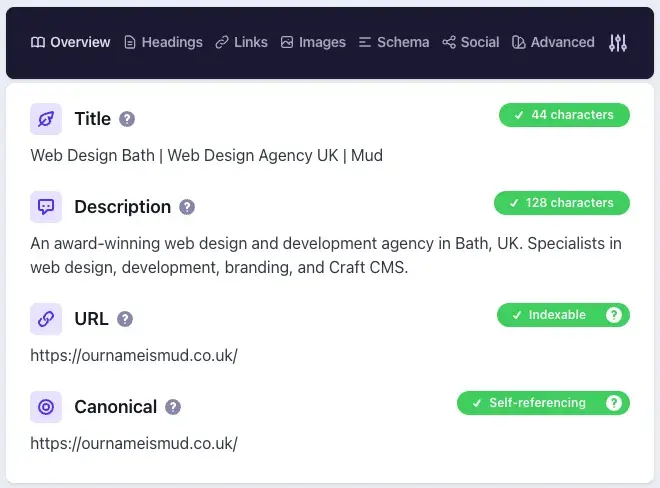
On filtered and paginated pages, the canonical should point at the main category or "view all" URL rather than at itself.
And then there's the classic mistake, which is a canonical still pointing at a staging domain months after launch. As we mentioned above, this is rare but bad. Ahrefs found broken canonical targets on only 2.6% of sites. It's severe when it happens, and it turns up on a decent proportion of the sites we inherit after a migration elsewhere.
💡 Further reading: Website Migration SEO: How to Protect Your Rankings
Who fixes it: your developer.
Index Bloat, Noindex and Faceted URLs
Index bloat is what happens when search engines end up storing hundreds of low-value URLs - filter combinations, tag archives, internal search results, print versions - all of which dilute what your site is actually about.
Things that should be noindexed: internal search results, thank-you pages, cart and checkout, login areas, and tag archives that exist because the CMS generated them rather than because you wanted them.
Things that should absolutely not be noindexed: anything you want to rank. Go and check your key landing pages specifically, because a misplaced noindex is the single most damaging mistake in technical SEO.
Faceted navigation on ecommerce sites deserves its own mention, since it can spawn thousands of URL combinations from a handful of filters. The usual approach is to index a small, deliberately chosen set of valuable combinations and block the rest.
Is Your Sitemap Trustworthy?
Your XML sitemap lists the URLs you'd like indexed, but think of it as a recommendation rather than an instruction.
The main rule is that it should contain only indexable, canonical, 200-status URLs. A sitemap stuffed with redirects, 404s and noindexed pages effectively teaches Google that your recommendations aren't worth following. Unfortunately, this is common, with one study finding 17.68% of sitemaps contain redirects and 11.22% list noindexed pages.
Keep lastmod dates accurate too. Faking them to look fresh is a well-known trick, and Google discounts sitemaps that pull it. Submit the thing in Search Console and read the report afterwards, and if you're running a larger site, split it by content type; it makes diagnosing indexing gaps far easier later on.
Who fixes it: most modern platforms generate sitemaps automatically. On Craft, SEOmatic does the job nicely. But verify everything is sorted rather than assuming.
3. Site Architecture and Internal Linking
This section is often skipped or overlooked. But how your pages connect to each other determines how authority moves around your site and how easily and whether everything gets found.
URL structure. URLs should be readable and descriptive, so /services/website-design rather than /page?id=447. Hyphens, lowercase, no unnecessary parameters. Keep them short and stable, because changing URLs means redirects, and redirects mean risk. Structure should reflect hierarchy, so that a URL tells a user and a crawler exactly where they are before the page has even loaded.
Click depth. This is how many clicks it takes to reach a page from your homepage, and deep pages get crawled less and rank worse. Important pages want to be within three clicks of home. Crawl your site with Screaming Frog and sort by crawl depth. It only takes 5 minutes and regularly turns up buried commercial pages you’d forgotten about. These shouldn’t be 6 clicks deep.
Orphan pages. An orphan page has no internal links pointing at it at all, which means search engines struggle to find it and users never will. Spot them by comparing a site crawl against your sitemap and your analytics; anything getting traffic but appearing in no crawl is orphaned. Research from SE Ranking suggests 69.32% of pages have no inbound internal links whatsoever.
Anchor text. Use something descriptive. "Click here" tells a crawler precisely nothing, whereas "technical SEO audit" tells it everything. And link from your strongest pages to the ones you're trying to uplift - most sites waste their internal authority linking endlessly back to the contact page.
Pagination. Paginated pages need to be crawlable through standard <a href> links, because "load more" buttons that only work with JavaScript hide everything behind them. Each paginated page should self-canonicalise rather than canonicalising back to page one. And infinite scroll needs paginated URL equivalents sitting behind it, or everything past the first screen may never get indexed.
Who fixes it: Internal linking is a content job, and it's the highest-priority technical SEO work a marketing team can do without developers.
4. Rendering and JavaScript
If you take one section away from this guide, make it this one. This is often the point at which many modern websites fall down on technical SEO. The thing is, it’s almost invisible from the front end because everything looks perfectly fine in your browser.
How Is Your Site Serving Content?
There are three broad approaches to how your site serves its content.
Server-side rendering means the server builds complete HTML and sends it ready to read. This is the best case for SEO, and what traditional platforms like Craft CMS, WordPress and Drupal do by default.
Static site generation means pages are pre-built as HTML files. Also excellent, and very fast indeed.
Client-side rendering means the server sends a near-empty shell and JavaScript assembles the page in the browser. This is the problem approach.
Googlebot can handle client-side rendering, but it does it in a second pass; pages go into a render queue, which can add days of delay. AI crawlers largely don't do it at all, and this is now well-evidenced rather than anecdotal.
Vercel and MERJ's joint analysis of over 500 million GPTBot fetches found zero evidence of JavaScript execution. GPTBot downloaded JavaScript files in about 11.5% of requests and ClaudeBot in 23.84%, but neither ran them.
There are exceptions worth knowing. AppleBot renders JavaScript through a browser-based crawler, much like Googlebot. And Gemini inherits Google's infrastructure, so it renders too. But for OpenAI, Anthropic, Perplexity, Meta and ByteDance, what's in your raw HTML is what they get.
How Do You Check What Crawlers Actually See?
The good news is you can do most of this yourself without any tooling at all.
Right-click any important page and choose "View page source". That's the raw HTML, before any JavaScript runs. If you can't find your main content in there, neither can any crawler that doesn't execute JavaScript. Compare it against "Inspect", which shows the rendered page - a big gap between the two is your warning sign.
Then use Search Console's URL Inspection tool and view the crawled HTML, which is what Google actually sees rather than what you hope it sees. Check the specifics while you're there: title tags, headings, body copy, internal links and structured data should all be present in that initial response.
If you're running a headless setup, this deserves a separate conversation with your development team rather than a quick patch, since the fix can be architectural.
💡 Further reading: What is a Headless CMS? A Guide for Marketers
Who fixes it: your developer.
5. Core Web Vitals, Speed and Mobile
Google measures three things, and the thresholds haven't moved for a while:
| Metric | Description | Good | Poor |
|---|---|---|---|
| LCP (Largest Contentful Paint) | How long your main content takes to appear | ≤ 2.5s | > 4.0s |
| INP (Interaction to Next Paint) | How quickly the page responds when clicked | ≤ 200ms | > 500ms |
| CLS (Cumulative Layout Shift) | How much the layout jumps about while loading | ≤ 0.1 | > 0.25 |
You need to hit "good" for 75% of real visits in order to pass, and many sites don't. Ahrefs found only 33% of websites clear the threshold, while the 2025 Web Almanac put it at 48% of mobile pages and 56% of desktop.
Core Web Vitals are a genuine signal but a fairly modest one, and a fast page won't outrank a better answer. Either way, a slow page loses users before they've read a word, and that can cost you considerably more than the ranking itself.
Field Data vs. Lab Data
Lab data is simulated. PageSpeed Insights runs your page under controlled conditions. Field data is what real visitors on real devices actually experience, collected by Chrome. Google ranks on field data; lab data is diagnostic.
So a perfect Lighthouse score sitting alongside poor field data means your real users are having a worse time than your test suggests, usually because they're on slower connections and older phones than your development team. Low-traffic pages won't have enough field data to report on at all, which is normal - use lab data as a proxy there.

The Usual Culprits
Images. These are almost always the biggest single win available. Serve modern formats like WebP or AVIF, size them correctly for the device, and lazy-load anything below the fold. But never lazy-load your hero image, since that's usually your LCP element and you'll only make things worse.
Fonts. Custom web fonts delay text rendering. Use font-display: swap, preload your primary font, and be honest about how many weights you're really loading.
Third-party scripts. Chat widgets, heatmaps, tag managers, A/B testing tools. These are the leading cause of poor INP scores, and they're typically added by marketing without thinking. Audit what's actually loading and remove what you're no longer using.
Layout shift. Set explicit width and height on images, and reserve space for banners and embeds so nothing leaps about mid-read.
Caching and CDN. If you’re not on a CDN, you need to have this conversation yesterday.
And What About Mobile?
Google now crawls and indexes with the smartphone crawler only, which means your mobile site is your site as far as search is concerned.
Content parity is the big one — everything on desktop should exist on mobile, because hidden or truncated mobile content is content Google doesn't see. Beyond that it's the usual: tap targets big enough, text readable without pinching, no horizontal scroll, and structured data and metadata present on the mobile version too.
Test on an actual mid-range phone on 4G rather than a resized desktop browser. It's a different experience, and it’ll get you closer to what your audience is seeing and experiencing.
Who fixes it: mostly your developer.
6. Structured Data and Schema
Structured data describes your content in a format machines can understand explicitly, rather than leaving them to infer it. We've covered this in real depth elsewhere, so here's the checklist version.
💡 Further reading: Schema Markup in 2026: What It Does, What It Doesn't, and Why It Still Matters
The types worth your time are Organization on your homepage, LocalBusiness if you've a physical location or defined service area, Article or BlogPosting on editorial content with author and date attached, Product with Offer and AggregateRating for ecommerce, and BreadcrumbList to improve how your URL displays in results.
FAQPage deserves a caveat. Google heavily restricted FAQ rich results some time ago, so don't add it expecting stars and dropdowns to appear. It still helps machines parse question-and-answer content, which matters elsewhere, but the visible payoff has largely gone.
For validation, run your key page templates through Google's Rich Results Test and the Schema.org validator, then watch Search Console's Enhancements reports for errors cropping up after site changes.
Make sure your markup matches visible page content, because marking up reviews that don't appear on the page is a manual action waiting to happen. And use JSON-LD rather than microdata — it's Google's stated preference, and it's far easier to maintain.
One thing to be clear about: schema won't magically get you cited in ChatGPT, and Google has now said explicitly that it isn't required for AI Overviews. What it does is make your content unambiguous, and unambiguous content is easier for a machine to summarise correctly and attribute properly.
7. On-Page Technical Elements
These are the bits and pieces that sit between content and code. They are mostly within your control without booking developer time, which makes them worth doing.
Titles and meta descriptions. One unique title per page, roughly 50 to 60 characters before truncation, primary keyword towards the front and brand at the end. Meta descriptions around 150 to 160 characters. It’s worth remembering that Google rewrites title tags 33.4% of the time anyway, and that missing meta descriptions aren't a ranking factor.
Heading hierarchy. One H1 per page describing what the page is about, then H2s and H3s in logical order. Don't skip from H2 to H4 because it looks better. Headings should describe content rather than simply being big, since screen readers and crawlers both navigate by them; this overlaps with accessibility.
Image alt text. Describe the image for someone who can't see it. Decorative images get empty alt attributes rather than keyword lists. Stuffing keywords in there harms accessibility and does nothing at all for rankings. This is the single most common technical issue on the web, incidentally, present on 80.4% of the domains Ahrefs studied.
Hreflang. Only relevant if you serve multiple languages or regions, but if you do, get it right. Ahrefs studied 374,756 domains using hreflang and found over 67% had issues, which makes it comfortably the most error-prone tag in SEO. Every language version must reference every other version including itself, include an x-default for users matching nothing, and use correct codes - it's en-gb, never en-uk.
💡 Further reading: How to Build an Accessible Website in 2026
Who fixes it: titles, descriptions, headings, and alt text are all yours to sort. Hreflang is for your developer.
8. Redirects, Errors and Status Codes
Redirects show up on 95.2% of sites, and that's completely fine — sites change, and redirects are how you handle it. The problems come from chains and from redirects that nobody has bothered to check.
Redirect chains. A chain is A to B to C, and the fix is to update the source so it points straight at C. One study found chains on 21.58% of sites. They waste crawl budget, add server load, and make users wait longer than they need to. Loops are worse and break the page entirely. Check every redirect after a migration, then check again a month later when someone's inevitably added a few more.
Status codes. Live pages return 200, moved pages return 301, and genuinely gone pages return 404 or 410. Use 302s only when you actually mean temporary, which is less often than people think. Watch for soft 404s too — pages returning a 200 status while displaying "not found" — which are extremely common on ecommerce sites with out-of-stock products.
Broken links. Check Search Console's Pages report and crawl for internal 404s. Internal broken links are the priority here because those are entirely self-inflicted and cost you crawl budget as well as user trust. A custom 404 page with navigation and search will rescue visitors who'd otherwise just leave.
Not every 404 needs fixing. A page that no longer exists and has no equivalent should 404 or 410 cleanly. Redirecting everything to the homepage is worse — Google treats it as a soft 404 anyway, and you've made the user's life harder for no benefit.
9. Security and Hosting
HTTPS. You want your entire site on HTTPS with HTTP versions 301-redirecting, certificate valid and set to auto-renew, and no mixed content where HTTPS pages load images or scripts over HTTP. Expired certificates throw browser warnings that stop traffic dead, and there’s no need for it.
Server performance. Time to First Byte wants to be under 600ms. Consistently slower than that means a hosting or application problem, and no amount of image optimisation is going to save you. Monitor uptime as well, since repeated downtime during crawls affects how often Google bothers coming back.
What to keep out of the index. Staging environments belong behind HTTP authentication rather than just a noindex tag. Admin, login, and account areas should be noindexed. And no sensitive documents sitting in publicly crawlable directories (you’d be surprised!).
Who fixes it: your developer or host.
10. How Often Should You Be Checking Technical SEO?
Technical SEO is never finished. This is stuff you want to check, if not all the time, then with regular frequency. Problems can arise for seemingly no reason.
Weekly. Search Console coverage and manual action alerts, plus uptime monitoring.
Monthly. Core Web Vitals field data, new 404s and broken links, index count against expectation, and Search Console performance trends.
Quarterly. A full site crawl, structured data validation, a redirect audit, an internal linking review, and a third-party script audit.
After every significant change. Crawl everything, check indexing, verify redirects. Technical SEO disasters are nearly all self-inflicted, and they nearly all happen on launch (or migration) day.
Make sure to set up alerts rather than relying on anyone remembering. Search Console emails, uptime monitoring, and a scheduled crawl at a minimum.
Russ Back, Development Director"The hard part of this stuff was never in the fixing. It's in the finding, and it's in keeping it going once the initial audit has been signed off and everyone's moved on to the next thing. Ongoing diagnosis beats a big and heroic annual clean-up every single time."
💡 Further reading: Website Management: A Practical Guide to Tools, Tips & Best Practice
The Complete 2026 Technical SEO Checklist
Crawl Access
- robots.txt not blocking anything important
- CSS and JavaScript crawlable
- Sitemap referenced in robots.txt
- Deliberate decision made on AI crawler access
- CDN and firewall not blocking crawlers by accident
- Crawl stats reviewed for waste (large sites only)
Indexing
- Indexed page count matches expectation
- "Not indexed" reasons reviewed in Search Console
- Self-referencing canonicals in place
- No canonicals pointing at staging, redirects or 404s
- Noindex applied to thin and utility pages
- No noindex on commercial pages
- Sitemap contains only indexable 200-status URLs
Architecture
- URLs readable, lowercase, hyphenated
- Key pages within three clicks of the homepage
- No orphan pages
- Descriptive internal anchor text
- Pagination crawlable via standard links
Rendering
- Main content present in raw HTML
- Internal links present in raw HTML
- Metadata and structured data server-rendered
- URL Inspection confirms Google sees the full page
Speed and Mobile
- LCP ≤ 2.5s, INP ≤ 200ms, CLS ≤ 0.1 on field data
- Images in modern formats and correctly sized
- Hero image not lazy-loaded
- Third-party scripts audited
- Caching and CDN in place
- Full content parity on mobile
Structured Data
- Organization or LocalBusiness on the homepage
- Article schema on editorial content
- Product schema on ecommerce pages
- Validated, and matching visible content
- JSON-LD format
On-Page
- Unique titles and descriptions
- Single H1, logical heading order
- Meaningful alt text
- Hreflang correct and reciprocal (if applicable)
Errors
- No internal broken links
- Redirect chains collapsed
- Correct status codes throughout
- Custom 404 page in place
Security
- HTTPS sitewide, certificate auto-renewing
- No mixed content
- TTFB under 600ms
- Staging environments password-protected
What Goes Wrong with Technical SEO in Reality?
We inherit a lot of websites, which means we see the same handful of problems time and again.
Staging settings still active. A noindex tag or a blanket disallow that made it through launch. We've come across sites that were effectively invisible for months because someone forgot.
Beautiful front end, empty HTML. A modern JavaScript build that looks superb, works perfectly for humans, and hands crawlers a blank page. This is even more important in the age of AI.
Untested redirect maps. Migrations where redirects were written, signed off, and then never checked. A decent proportion of them point at the homepage.
Marketing tools nobody removed. Audit for marketing tools. If you have six scripts loading on every page, but you’re only using two of them, you have a problem to solve.
Sitemaps full of dross. Redirects, 404s, and noindexed pages listed as URLs to index, quietly undermining Google’s confidence in your content.
Your Technical SEO is Foundational
There’s always a reason something gets deprioritised. The same is true of technical SEO. It’s invisible when it’s working, difficult to attribute pipeline to, and there’s always something shiny to distract attention.
But the data is unambiguous. Most sites fail Core Web Vitals. Most hreflang implementations are broken. Most pages have no internal links pointing at them. This is good news if you’re prepared to put in the work.
Start with crawl access and indexing ASAP. Get through architecture and rendering this quarter. And set up the monitoring so you're not doing a heroic shift cleaning up again in eighteen months.
The fundamentals haven't changed. There are just more machines relying on them than there used to be.
Technical SEO FAQs
Technical SEO includes everything that affects how search engines and AI systems access, understand, and evaluate your site. Crawling, indexing, architecture, page speed, mobile experience, structured data, security, and error handling. It's distinct from on-page SEO (your content) and off-page SEO (your backlinks), although all three overlap considerably in practice.
Start with crawl access and indexing, because nothing else matters if search engines can't reach or store your pages. Then architecture and rendering, then performance and structured data, then maintain it on a sensible cadence. Working in that order means your effort adds up rather than getting spent on pages nobody can reach.
Quarterly is fine for most sites, plus a full check after any significant change, like a migration. Monthly monitoring of a handful of core metrics will catch most problems.
If you're going to do it properly and thoroughly, yes. Rendering, server configuration, redirects, structured data implementation, and hreflang all need development work. But internal linking, titles and descriptions, heading structure, alt text, and third-party script management are all yours.
Yes. AI systems can't cite content they can't reach, and most of them are less capable than Googlebot at handling complicated sites. Clean HTML, fast pages, and clear structured data give you the best chance of being read and quoted accurately. What gets you cited beyond that is being worth citing.


